Your app has the invoice total, your customer's accounting system has the payment status, and your dashboard needs everything in one reporting currency. Copying those figures through a spreadsheet may work for the first customer. It becomes much harder to keep accurate as the number of transactions grows.
An accounting API lets software read or write accounting records through defined requests. It can connect an app to invoices, customers, bills, payments and ledger data, subject to the platform's permissions and supported operations. A currency API supplies exchange-rate data that can support that workflow; it does not replace the accounting connection.
This guide explains which integration route to choose, what data to preserve and how to keep currency conversion from quietly changing the meaning of your numbers.
What can an accounting API do?
The exact feature set depends on the provider. Common tasks include importing invoice status into a customer portal, passing approved expenses to the books and reading balances for a management dashboard. Apideck's accounting API overview illustrates the range of objects that integrations can expose.
These are the objects you are likely to encounter:
|
Object |
What it represents |
Integration question |
|---|---|---|
|
Customer or supplier |
The counterparty |
Which source ID identifies the same organisation? |
|
Invoice or bill |
Money owed by a customer or to a supplier |
Can you read, create and update it? |
|
Payment |
A payment record and its allocations |
Which invoices does it settle? |
|
Ledger account |
A category in the chart of accounts |
Who owns the account mapping? |
|
Journal entry |
A posting to ledger accounts |
Does the workflow need direct posting at all? |
|
Report |
An aggregate produced by the accounting system |
What dates, basis and currency does it use? |
Support for an object does not automatically mean support for every action on it. Reading an invoice, creating a draft invoice and sending that invoice to a customer are separate capabilities. Write down the operation you need before comparing provider feature lists.
An accounting payment record is also distinct from moving money. A system may record that an invoice was paid without offering a payment-processing API. Keep that boundary clear in your product requirements.
Direct API, unified API or embedded accounting?
Three different approaches appear under the accounting API label. They solve related but different problems.
A direct integration connects to a specific platform, such as QuickBooks Online. Your application implements that platform's authorisation, field mapping, pagination and error handling. This is a practical starting point when your first customers all use the same system or need its specialised features.
A unified accounting API exposes a common model across several platforms. Apideck's connector catalogue shows the available connections; Rutter also describes a unified model with access to platform-specific data. A common schema can reduce repeated work, but you still need to check coverage for each connector and operation you will ship.
Embedded accounting brings accounting functionality into your own product experience. For example, Tight's accounting API describes an offering that includes ledger, reporting and bookkeeping features. That is a different architectural choice from simply syncing data with a customer's existing ledger.
Choose based on your product's responsibility. If it only needs to display outstanding invoices, building a bookkeeping experience is unnecessary. If it must serve customers across multiple ledgers, compare unified coverage against the cost of maintaining several direct connections.
A QuickBooks integration starts with a company connection
A QuickBooks Online integration needs permission to access a particular company. Intuit's OAuth client documentation describes the authorisation-code flow, access tokens and refresh tokens. Keep those credentials on your server and associate the connection with the correct customer in your application.
Do not treat an access token as the whole connection. Your stored integration state also needs the provider, connected company identifier, authorisation status and sync progress. If the user disconnects, the app should show that the data is no longer updating.
The QuickBooks Online invoice reference documents this read request shape:
GET /v3/company/{realmID}/invoice/{invoiceId}The placeholders stand for the connected company's ID and an existing invoice ID. A successful request returns the accounting platform's invoice record. Start with a sandbox company and a read operation, then compare the returned values with the source UI before enabling writes. This guide does not make an authenticated request or create any accounting records.
For writes, make the initial use case narrow. Creating an invoice may depend on an existing customer, valid items and tax settings. Updating an existing record may require a current version token. These dependencies are part of the integration, even if the HTTP request itself is only a few lines long.
Where exchange rates fit
Consider a dashboard for a company whose home currency is USD. It receives an invoice denominated in EUR. There are two values to keep: the original invoice amount and the translated amount used for a specific report or display.
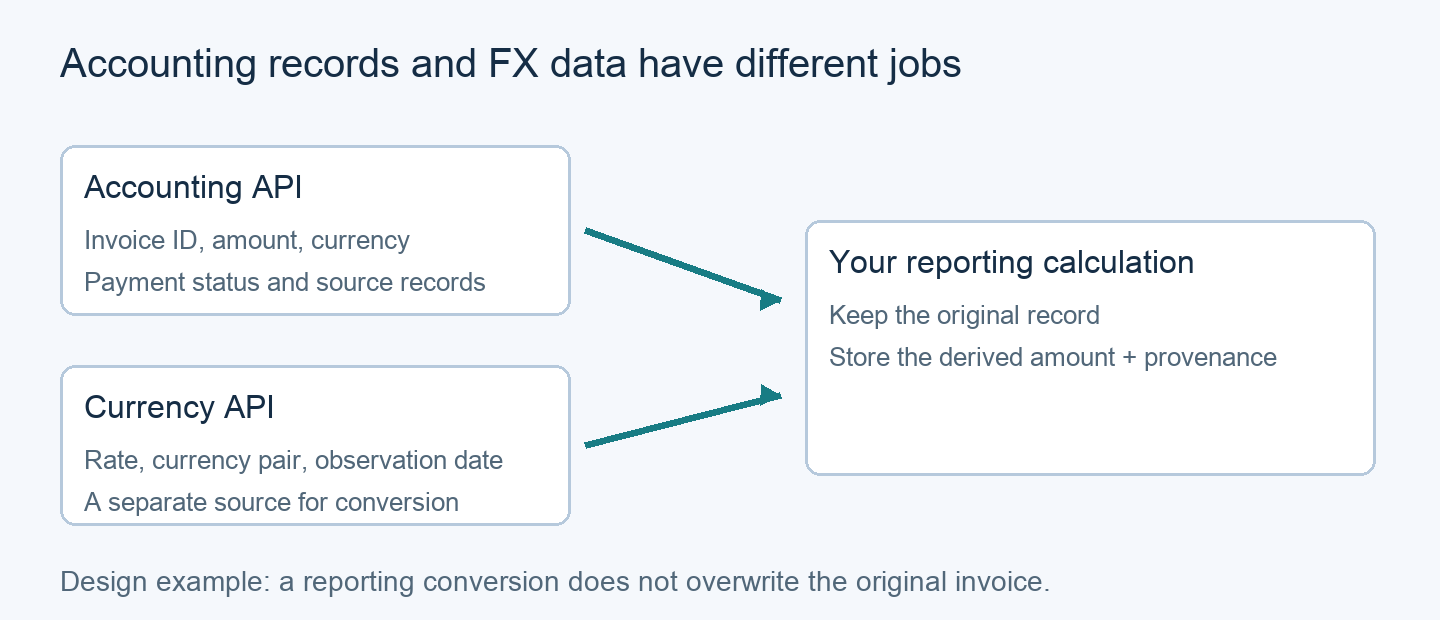
Application design example. The FX layer adds a reporting value while preserving the source record.
The accounting system may already supply the relevant home-currency amount or exchange rate. Inspect that first. An external rate feed is useful when your application has a separate conversion requirement, such as an indicative dashboard view, but should not silently overwrite the rate recorded in the books.
Before calculating, decide:
- Which currency is the amount currently in?
- Which currency is the output in?
- Which date and source does the reporting policy require?
- Is the conversion for display, reconciliation or a posting back to the ledger?
Our guide to handling multiple currencies in a SaaS app covers the broader data-model implications. Keeping the source amount and currency alongside the derived value makes later reconciliation much easier.
Check the direction of the rate before multiplying
QuickBooks defines an invoice's ExchangeRate as the number of home-currency units for one unit of the transaction currency, when multicurrency is enabled. In a USD-home company with a EUR invoice, that direction is USD per EUR. A feed returning EUR per USD would need to be inverted before serving the same calculation.
Here is a deterministic example using illustrative values. It is a local calculation, not an invoice payload or a live market quote:
from decimal import Decimal, ROUND_HALF_UP
invoice_eur = Decimal("250.00")
usd_per_eur = Decimal("1.08") # Illustrative fixture
report_usd = (invoice_eur * usd_per_eur).quantize(
Decimal("0.01"), rounding=ROUND_HALF_UP
)
print(report_usd) # 270.00We ran this example locally and verified 250.00 × 1.08 = 270.00. The USD rounding shown here is an explicit example policy, not a universal rule for every currency or accounting system. If the rate direction is reversed, a successful API response can still lead to the wrong result.
For the rate-data component, The Currency API documentation describes latest, historical and conversion endpoints. Match the request's source and target currencies to the direction you need, and retain the rate's timestamp with the result. Historical availability and the reporting policy both need checking before a backfill.
Build a sync you can explain and recover
Once the first request works, the next challenge is keeping records consistent over time. A useful integration makes it possible to answer both “Where did this number come from?” and “What happens if this job runs twice?”
Store provider IDs together with the connection or company ID. Invoice 123 in one customer's account must not collide with invoice 123 in another. Keep a mapping between your own IDs and the source IDs rather than matching records by display names alone.
Track pages and sync checkpoints so a failed batch can resume. If the provider supports change notifications, use them to trigger the supported retrieval flow, and keep a reconciliation process for missed or delayed changes. Notification behaviour varies by platform; a webhook is not proof that every record has been synchronised.
Before retrying a write, establish whether the first request succeeded. Use the provider's supported idempotency mechanism where available, or a durable local operation record and reconciliation strategy. Blindly repeating an invoice-creation request can produce duplicate records.
Finally, expose the last successful sync and any unresolved mapping errors to the user. A dashboard with an old but visible timestamp is easier to assess than one that quietly presents stale values as current.
How to choose your first accounting API
Shortlist against one end-to-end workflow, such as “read open invoices, preserve their original currency and show an indicative USD total.” Then check the following before expanding:
- The customer's exact accounting product and region are supported.
- The required objects and read/write actions are available.
- The connection model separates customers and companies correctly.
- Pagination, rate limits, retries and disconnects have defined handling.
- Currency fields, rate direction and rounding survive the mapping.
- The sandbox reproduces the important fields and failure cases.
- Pricing and support fit the expected number of connections and requests.
Start with read-only data and a few known records. Add writes only after the mapping and reconciliation process are dependable. If exchange rates are part of that workflow, use The Currency API endpoint reference to build the rate layer alongside the accounting connection, with each service doing the part it is designed to handle.